Why Downloading TikTok Videos Without a Watermark Actually Matters
If you've ever saved a TikTok video directly from the app, you know the frustration - that bold, animated watermark with the creator's username plastered across the clip. For casual viewers, it's harmless. But for content creators, marketers, educators, and social media managers who want to repurpose footage legitimately, that watermark is a real problem.
Whether you're compiling a video montage, archiving your own TikToks for a portfolio, or downloading a clip you filmed yourself, you deserve a clean version of the file. The good news? In 2026, it's easier than ever to do it - completely free, no app installation required.
Is It Legal to Download TikTok Videos Without a Watermark?
This is the first question most people ask, and it's the right one to start with. The short answer: it depends on what you do with the video afterward.
Downloading a TikTok video for personal, offline viewing is generally acceptable. However, reuploading someone else's content to another platform without credit - or using it commercially - can violate TikTok's Terms of Service and copyright law. Always respect the original creator. If you're downloading your own TikToks or content you have explicit permission to use, you're in the clear.
As a rule of thumb: download responsibly, credit generously, and never monetize content that isn't yours.
What You'll Need Before You Start
The process is refreshingly simple. You don't need to install any software, create an account, or pay for a subscription. Here's all you need:
- A device with a web browser (phone, tablet, or computer)
- The URL or link to the TikTok video you want to download
- A reliable internet connection
- A free online downloader tool like WowDownloader
That's genuinely it. No sign-ups, no credit cards, no browser extensions eating up your RAM.
Step-by-Step: How to Download TikTok Videos Without a Watermark
Follow these steps carefully and you'll have a clean, watermark-free video file on your device in under a minute.
Step 1 - Find the TikTok Video and Copy Its Link
Open the TikTok app on your phone or visit TikTok.com on your browser. Navigate to the video you want to download. Tap the Share button (the arrow icon on the right side of the screen), then select "Copy Link" from the share menu. The URL is now in your clipboard.
On desktop, you can simply copy the URL directly from your browser's address bar - it works just as well.
Step 2 - Open WowDownloader in Your Browser
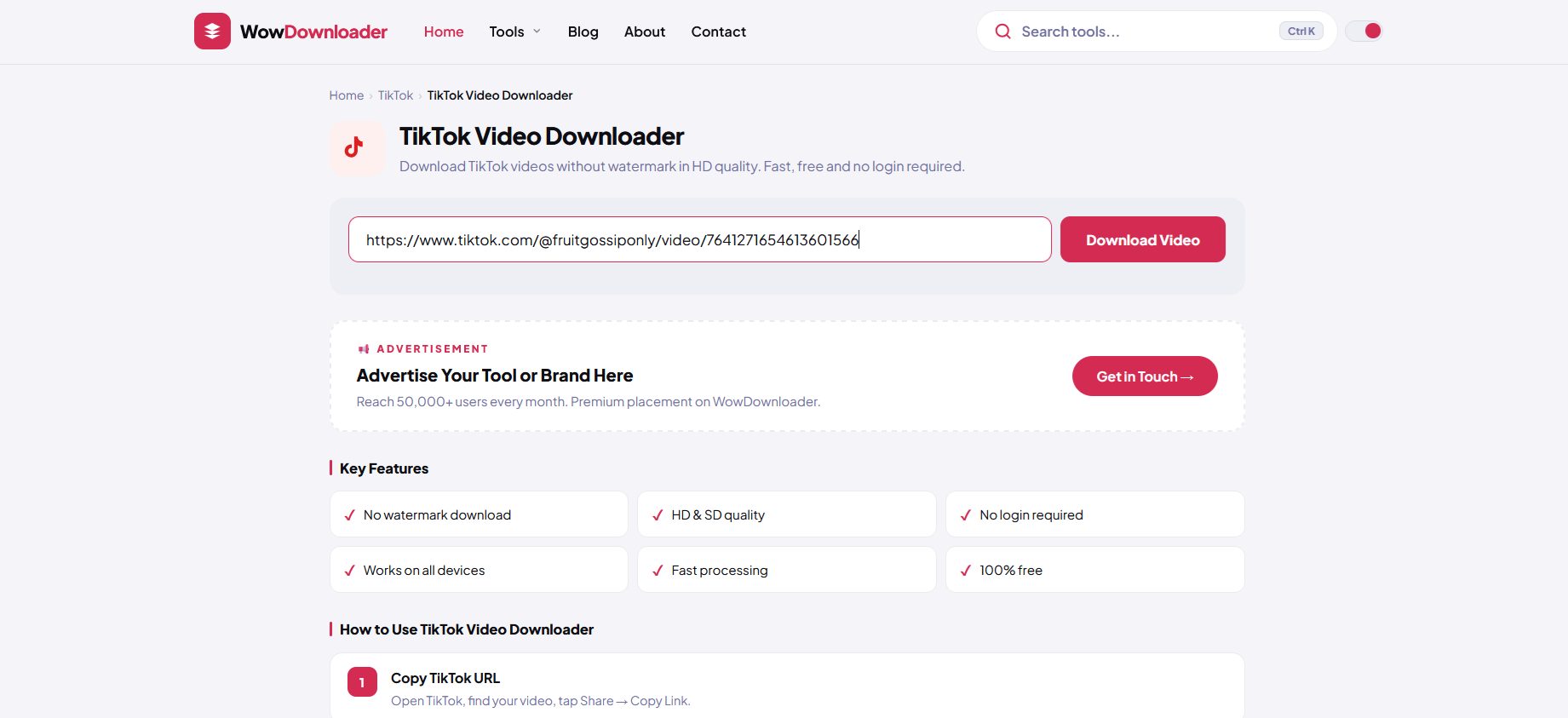
Go to WowDownloader using your browser. The interface is clean and straightforward - you'll see a search or paste field front and center. No distracting pop-ups, no confusing menus.
Step 3 - Paste the TikTok Video URL
Click or tap inside the input field on the WowDownloader page and paste the copied TikTok link. You can use Ctrl+V on Windows, Cmd+V on Mac, or long-press and tap "Paste" on mobile. Double-check the URL looks correct before proceeding.
Step 4 - Click the Download Button
Hit the Download button. The tool will process the video link within a few seconds. Behind the scenes, it's fetching the original video file - without the TikTok watermark overlay.
Step 5 - Choose Your Format and Save the File
Once processed, you'll typically see one or more download options. Select your preferred quality (HD is usually available) and click the download link. Your browser will either save the file automatically or prompt you to choose a save location. Done - you now have a clean MP4 file on your device.
Downloading TikTok Videos on Different Devices
The process above works across all platforms, but here are a few device-specific notes to make things smoother.
On iPhone (iOS)
Safari on iOS sometimes previews the video instead of downloading it. If that happens, long-press the download link and select "Download Linked File" to save it directly to your Files app. You can then move it to your Photos library from there.
On Android
Android handles MP4 downloads natively through Chrome. The file will land in your Downloads folder and should be accessible via your Gallery app immediately after saving.
On Desktop (Windows/Mac)
Desktop downloads are the smoothest experience. The MP4 file saves to your default Downloads folder in seconds. From there, you can edit, share, or archive the video however you like.
Pro Tips for Better Results
Getting the download is step one. Here's how to make sure you always get the best possible result:
- Always use the direct video URL: Links from TikTok's "Copy Link" feature work best. Shortened or shared links from third-party apps can sometimes fail to process correctly.
- Check the video privacy settings: Private TikTok videos cannot be downloaded by third-party tools - the creator has restricted access. Only publicly available videos work.
- Try HD quality first: Most tools, including WowDownloader, offer multiple resolution options. Always try the highest quality first - storage is cheap, but blurry footage is forever.
- Download your own content regularly: TikTok videos can be removed by the platform at any time. If you've created content you're proud of, back it up externally as a habit.
- Avoid tools that ask for app installs: Legitimate online video downloaders work entirely in your browser. Any site that insists you install an APK, Chrome extension, or desktop app before downloading should be treated with caution.
Common Issues and How to Fix Them
Even with the best tools, things can occasionally go sideways. Here are the most common problems and their solutions.
"Video not found" or Processing Error
This usually means the video is private, has been deleted, or the URL was copied incorrectly. Go back to TikTok, re-copy the link, and try again. Make sure the video is still publicly visible before attempting the download.
The Downloaded File Has a Watermark Anyway
Some lower-quality downloaders add their own watermark or fail to strip TikTok's. If you're seeing a watermark on the downloaded file, try a different tool. Quality matters here - not all downloaders are built the same.
The File Downloads as a Webpage or Wrong Format
This is a browser behavior issue, not a tool problem. Right-click (or long-press on mobile) the download button and choose "Save link as" or "Download linked file" to force the correct file type to save.
Slow Download Speeds
Your connection speed and the video's file size both affect this. HD TikTok videos are typically between 5-
30MB, so even on a moderate connection, it should complete in seconds. If it's taking much longer, try refreshing the page and repeating the process.
The Link Won't Paste Into the Field
This is common on iOS Safari. Try switching to Chrome on your phone, or manually type the URL if it's short enough. Alternatively, open WowDownloader in a new tab and try pasting again - it sometimes resolves itself.
Alternative Use Cases: More Than Just Saving Videos
People download TikTok videos for more reasons than you might think. Here are some legitimate, popular use cases:
- Content creators backing up their own TikToks before account issues arise
- Video editors working with UGC (user-generated content) for brand campaigns - with creator permission
- Teachers and educators downloading explainer videos or demonstrations to use in offline classroom presentations
- Journalists and researchers archiving viral content for reporting or academic documentation
- Personal memory-keeping - saving clips of friends, family moments, or events shared publicly on TikTok
In every one of these scenarios, the key is the same: use the content ethically and appropriately.
Frequently Asked Questions
Can I download TikTok videos without watermark on my iPhone?
Yes, absolutely. Use a browser-based tool like WowDownloader on Safari or Chrome for iOS. After the download link appears, long-press it and select "Download Linked File" to save it to your iPhone's Files app without any watermark.
Does downloading TikTok videos without a watermark break any laws?
Downloading for personal use is generally fine. The legal issues arise when you reupload, redistribute, or monetize someone else's content without their permission. Always credit creators and get explicit consent before using someone's video commercially.
Why do some TikTok video links fail to download?
The most common reasons are: the video is set to private, the account has been banned or suspended, the video was deleted by the creator, or the link was copied incorrectly. Always verify the video is still live and publicly accessible on TikTok before trying to download it.
Is there a limit to how many TikTok videos I can download?
With most free online tools - including WowDownloader - there's no hard cap on the number of downloads per day for standard use. You can download multiple videos back-to-back without needing a paid account.
Can I also download TikTok audio (MP3) using the same method?
Yes! Many TikTok downloaders, including WowDownloader, give you the option to save just the audio track as an MP3 alongside the full video file. This is especially useful if you want to extract a trending sound or save a song from a TikTok video for offline listening.