
Why Would You Need to Download a YouTube Thumbnail?
YouTube thumbnails are the first thing a viewer sees before clicking on a video. They are carefully designed, often professionally edited images that represent the content of an entire video in a single frame. Creators, marketers, and researchers all have legitimate reasons to save these images.
Whether you're a content creator looking for design inspiration, a social media manager analyzing competitor strategies, or a developer building a tool that pulls video metadata, knowing how to grab a high-resolution thumbnail quickly is a genuinely useful skill. The process is simpler than most people expect - once you know the right approach.
What Resolution Are YouTube Thumbnails?
YouTube recommends that creators upload thumbnails at 1280×720 pixels (720p), with a 16:9 aspect ratio and a file size under 2MB. In practice, most thumbnails you'll encounter on popular channels are uploaded at this resolution or higher.
However, YouTube also stores multiple versions of each thumbnail automatically, ranging from tiny preview sizes all the way up to the maximum quality (mqdefault, hqdefault, sddefault, and maxresdefault). The maxresdefault version is the one you want - it delivers the full 1280×720 image without any compression artifacts.
Not every video has a maxresdefault version available. Older videos or those from smaller channels may only have an sddefault (640×480) or hqdefault (480×360) version stored. A good downloader tool will automatically find the highest resolution available.
Method 1: Using WowDownloader to Download YouTube Thumbnails
The fastest and most beginner-friendly approach is to use a dedicated online tool. WowDownloader is a free browser-based platform that supports YouTube, TikTok, Instagram, Spotify, and more - no software installation required.
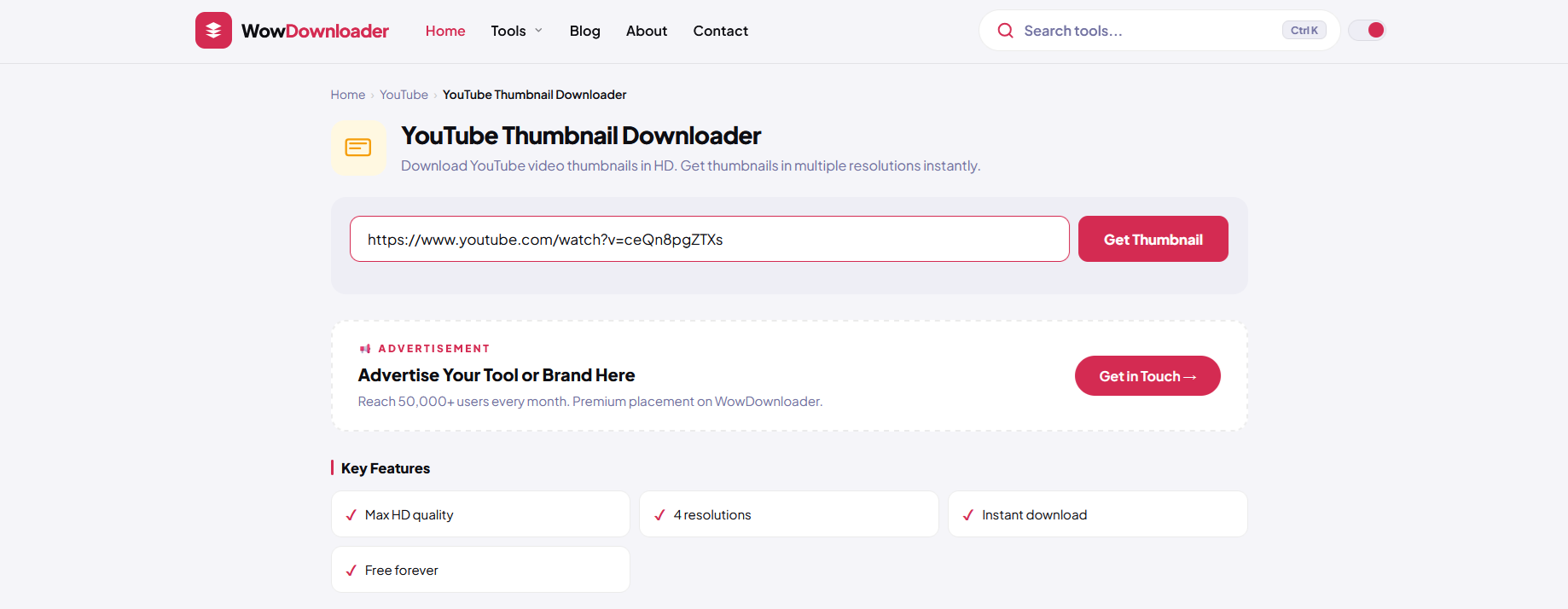
Step-by-Step Guide
- Step 1: Open YouTube and navigate to the video whose thumbnail you want to download.
- Step 2: Copy the full URL from the browser address bar. It will look something like https://www.youtube.com/watch?v=XXXXXXXXXXX.
- Step 3: Go to WowDownloader.com and paste the URL into the input field on the homepage.
- Step 4: Click the Download button and wait a moment for the tool to process the link.
- Step 5: Select the thumbnail resolution you want - always aim for maxresdefault or the highest option listed.
- Step 6: Click the image download button and save it directly to your device.
The whole process takes under 30 seconds. WowDownloader handles the resolution detection automatically, so you don't have to manually construct any URLs or use browser developer tools.
Method 2: Manually Constructing the Thumbnail URL
If you prefer a hands-on approach without using any external tool, YouTube stores thumbnails at predictable, publicly accessible URLs. All you need is the video ID - the string of letters and numbers that appears after ?v= in a YouTube link.
YouTube Thumbnail URL Formats
Once you have the video ID (let's call it VIDEO_ID), you can access thumbnails at the following addresses:
- Max Resolution (1280×720): https://img.youtube.com/vi/VIDEO_ID/maxresdefault.jpg
- Standard Definition (640×480): https://img.youtube.com/vi/VIDEO_ID/sddefault.jpg
- High Quality (480×360): https://img.youtube.com/vi/VIDEO_ID/hqdefault.jpg
- Medium Quality (320×180): https://img.youtube.com/vi/VIDEO_ID/mqdefault.jpg
- Default (120×90): https://img.youtube.com/vi/VIDEO_ID/default.jpg
Simply replace VIDEO_ID with the actual ID from the video you're targeting, paste the URL into your browser, and then right-click the image to save it. This method works on any device with a browser and requires no third-party tools whatsoever.
Method 3: Using Browser Developer Tools
This method is best suited for developers or technically inclined users. On any YouTube video page, right-click anywhere and select Inspect (or press F12). Navigate to the Network tab, filter by img, and reload the page. You'll see all image requests made by YouTube, including the thumbnail files.
Click on any thumbnail request, open the preview, and copy the direct URL. This gives you full control over which image you grab and lets you verify the exact resolution being served. It's more steps than the other methods but can be useful when debugging or working within a development environment.
Tips for Getting the Best Thumbnail Quality
Not all thumbnails are created equal. Here are some practical tips to make sure you always get the best possible image.
Always Try maxresdefault First
Start with the maxresdefault URL. If it returns a black placeholder image or a 404 error, drop down to sddefault, then hqdefault. Automated tools like WowDownloader handle this fallback logic for you, but if you're doing it manually, work your way down the list.
Check the Aspect Ratio
Some thumbnails at the hqdefault resolution include black bars on the top and bottom to maintain a 4:3 ratio. The maxresdefault and sddefault versions typically preserve the native 16:9 ratio. If clean edges matter for your use case, prioritize those formats.
Use a JPG Optimizer If You're Republishing
YouTube stores all thumbnails as .jpg files. If you plan to use the image in a blog post or presentation, running it through a free compression tool like Squoosh or TinyPNG can reduce file size by 20-40% without a noticeable quality loss.
Respect Intellectual Property
Thumbnails are creative works, and most are protected by copyright. Downloading one for personal reference, design study, or embedding in an editorial article is generally considered fair use. Republishing someone else's thumbnail as your own content - or using it commercially without permission - can create legal issues. Always use downloaded thumbnails responsibly.
Common Issues and How to Fix Them
The Thumbnail Comes Out Black or Blank
This almost always means the maxresdefault version doesn't exist for that particular video. YouTube only generates this size when the creator uploads a custom thumbnail at that resolution. Try sddefault.jpg instead - it's available for virtually every video on the platform.
The Image Looks Blurry After Downloading
If you downloaded the hqdefault version (480×360), it will look pixelated when displayed at large sizes. Go back and grab the maxresdefault or sddefault version. If neither is available and the video is older, the creator may have never uploaded a high-res custom thumbnail in the first place.
The Downloader Tool Isn't Working
Browser-based tools can occasionally be affected by network timeouts or temporary service issues. If one tool isn't responding, try pasting the video URL into a different tab or clearing your browser cache. Alternatively, use the manual URL method described above as a reliable fallback - it requires no external service at all.
The Video URL Isn't Being Recognized
Make sure you're copying the full URL including the https:// prefix. Shortened URLs like youtu.be/XXXXXXX are also supported by most tools, including WowDownloader. If you're using a playlist or channel link by mistake, navigate to the specific video page first.
Frequently Asked Questions
Is it legal to download YouTube thumbnails?
Downloading a YouTube thumbnail for personal use, research, or editorial commentary is widely considered fair use in most jurisdictions. However, using a downloaded thumbnail commercially - for example, in an advertisement or product - without the creator's permission can violate copyright law. Always check before redistributing.
What is the highest resolution available for a YouTube thumbnail?
The maximum resolution YouTube serves is 1280×720 pixels, stored as the maxresdefault.jpg file. This is only available if the content creator uploaded a custom thumbnail at that size. For older or smaller channel videos, the highest available may be 640×480 (sddefault).
Can I download thumbnails from YouTube Shorts?
Yes. YouTube Shorts are still hosted on the YouTube platform and use the same URL structure. Paste the Shorts URL into a tool like WowDownloader or extract the video ID and use the manual URL method. Note that Shorts thumbnails are often in a vertical (9:16) format rather than the standard landscape orientation.
Do I need to create an account to use WowDownloader?
No. WowDownloader is a completely free, no-account-required tool. You simply paste the URL, select your preferred resolution, and download. There's no registration, no email confirmation, and no paywall for standard downloads.
Can I use a downloaded YouTube thumbnail as my own video thumbnail?
Technically you can upload any image as a thumbnail on your own channel, but using someone else's creative work without permission is a copyright violation and could result in a content claim or channel strike. It's also simply bad practice. Use the downloaded thumbnail purely as a reference or for educational purposes, and create your own original artwork for publishing.
Final Thoughts
Downloading a YouTube thumbnail in HD quality is one of those tasks that sounds complex but turns out to be remarkably straightforward once you understand how YouTube stores its images. Whether you use the manual URL method, browser dev tools, or a no-fuss solution like WowDownloader, you can have a full-resolution thumbnail saved to your device in under a minute.
The key takeaway is to always try maxresdefault first, fall back to sddefault if it's unavailable, and use the image responsibly. Thumbnails represent a creator's effort and originality - treat them with the same respect you'd want for your own work.